Architecting SMB Cloud Migration: Sequencing, Hybrid Risks, and Rollback Blueprint
Transitioning small and mid-sized businesses (SMBs) to the cloud requires more than moving workloads—it demands a structured operational sequence that prevents business disruption. Misconfigured identity synchronization, rushed data shifts, and unmapped DNS dependencies often transform modernizations into chaotic firefights.
To achieve operational stability, IT leaders must sequence migrations logically, resolve hybrid operational pitfalls early, and establish clear rollback thresholds at each phase.
The Optimal SMB Migration Sequence
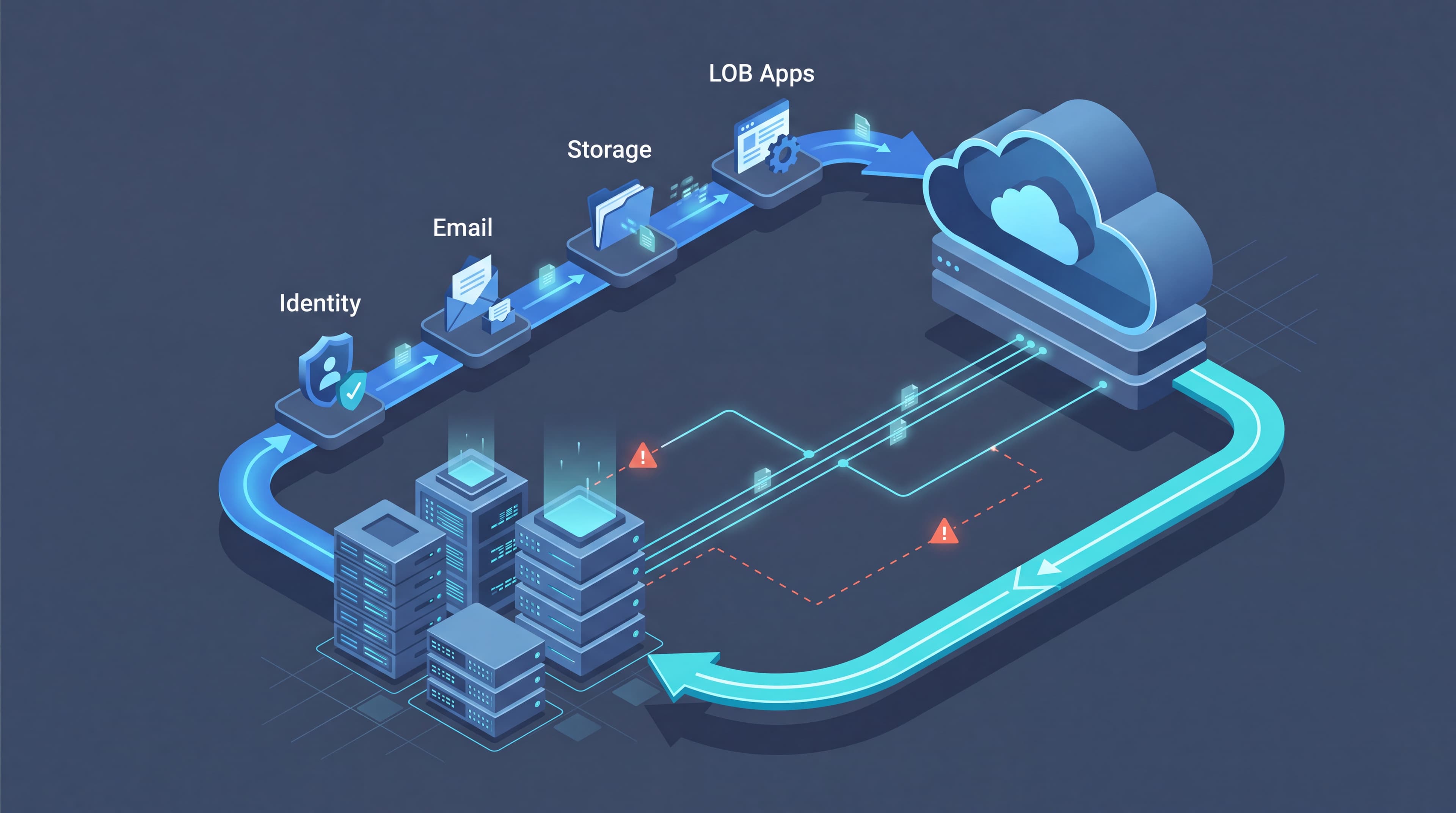
Attempting to migrate line-of-business applications before establishing cloud identity is a recipe for authentication failures and governance gaps. SMBs achieve the highest rate of success by following a strict dependency-based migration sequence:
- Identity & Directory Integration: Deploy Microsoft Entra Connect to establish hybrid identity. Clean up local Active Directory attributes, resolve UPN mismatches, and enable Conditional Access policies before granting cloud access.
- Email & Messaging: Migrate mailboxes to Exchange Online. Moving communication platforms first establishes baseline cloud tenant operation while introducing users to cloud-native authentication workflows with minimal disruption to data architecture.
- File Services & Unstructured Data: Transition legacy file servers to SharePoint Online, OneDrive, or Azure Files. Re-architect legacy folder hierarchies into modern hub sites with target metadata and automated lifecycle policies.
- Line-of-Business (LOB) Applications: Shift core business applications to Azure virtual machines, Azure App Services, or managed database instances. Validate network latency, VPN gateway connections, and legacy database dependencies prior to full cutover.
- Disaster Recovery & Business Continuity: Configure cloud-native backup solutions and Azure Site Recovery (ASR) to secure migrated workloads and complete the hybrid resilience loop.
Navigating Common Hybrid Operations Pitfalls
Operating in a hybrid state creates temporary friction points where legacy on-premises architecture intersects with cloud services. IT teams must proactively address three recurring pitfalls:
1. Stale Active Directory Synchronization
Synchronizing legacy Active Directory domain controllers without prior attribute hygiene leads to orphaned user accounts, duplicated User Principal Names (UPNs), and compromised security postures. Always perform a directory audit using Microsoft Entra Connect Health tools before initiating initial synchronization.
2. Overshared Microsoft 365 Permissions
Lifting and shifting legacy file server permissions straight into SharePoint or Teams often exposes sensitive data across the tenant. SMBs must audit access rights prior to migration and implement automated Sensitivity Labels and Data Loss Prevention (DLP) rules.
3. Undocumented DNS Cutovers
Spontaneous DNS changes without lower TTL settings or comprehensive record mapping lead to extended downtime during mail and application cutovers. Lower DNS Time-To-Live (TTL) values to 300 seconds at least 48 hours prior to maintenance windows, and document all MX, CNAME, and Autodiscover dependencies.
Phased Roadmap & Risk Mitigation Matrix
| Phase | Focus Area | Core Deliverables | Rollback & Risk Mitigation |
|---|---|---|---|
| Phase 1 | Identity & Security | Entra ID Sync, MFA, Conditional Access | Pause sync engine; revert authentication to local AD DS domains. |
| Phase 2 | Messaging & Collaboration | Exchange Online cutover, Teams setup | Maintain dual-routing MX records until mail flow is validated. |
| Phase 3 | File Services | SharePoint / Azure Files rollout | Keep legacy file shares read-only for 7 days before final decommissioning. |
| Phase 4 | LOB Applications | Azure VM / App Service deployment | Retain hypervisor snapshots and database transaction log backups on-premises. |
| Phase 5 | DR & Governance | Azure Site Recovery, DLP & Retention | Retain legacy backup agent retention schedules during hyper-care period. |
Ensuring Long-Term Hybrid Stability
Cloud migration is an ongoing operational strategy rather than a single event. By maintaining strict sequencing, auditing hybrid identity synchronization, and enforcing explicit rollback plans, SMBs can modernize efficiently while minimizing risk.
Schedule a cloud readiness review with Bitscaled before your next migration phase to ensure a secure, seamless transition.