Beyond Fragile Scripting: Engineering Deterministic Bot Operations
Back-office operations rely heavily on repetitive, manual data manipulation across disparate enterprise software applications. From matching purchase orders to inputting ledger records, human operators spend thousands of cumulative hours transferring data between legacy terminal emulations, desktop applications, web portals, and relational databases. Robotic Process Automation (RPA) provides a non-invasive layer to automate these transactional pathways without requiring multi-year API retrofits on legacy core systems.
However, many early RPA initiatives fail to achieve long-term return on investment due to fragile implementation. When workflow bots are constructed as simple macro-recordings, slight variations in interface layout, latency spikes, or unexpected data formatting cause immediate runtime failures. To transition from brittle automation to production-grade reliability, operations teams must apply rigorous software and process-engineering principles to every stage of the bot lifecycle.
This guide outlines the practical engineering standards for implementing resilient RPA Solutions, establishing clear process evaluation frameworks, building robust exception-handling pipelines, and maintaining operational visibility across back-office workflows.
Evaluating Candidate Processes: Selection Criteria and Feasibility Matrix
Not every repetitive task should be automated with desktop or server-based workflow bots. Successful RPA deployment depends on identifying workflows with high determinism, structured data inputs, and high transaction volume.
When assessing back-office candidate processes, evaluate four core technical and operational criteria:
- Input Structure: Inputs must be machine-readable and standardized (e.g., electronic data interchange files, structured CSVs, standardized PDF forms, or direct database queries). Unstructured physical paper or free-form hand-written notes introduce noise that degrades automation accuracy.
- Rule Determinism: The process logic must follow explicit, conditional decision trees without requiring subjective human judgment or artistic interpretation.
- UI and System Stability: The underlying target software systems (e.g., SAP, Oracle ERP, custom web front-ends) should have stable visual layouts and predictable navigation pathways. Frequently redesigned front-ends significantly increase bot maintenance overhead.
- Transaction Volume and Frequency: High-volume, high-frequency execution justifies the engineering investment required for enterprise-grade exception handling and telemetry.
| Evaluation Metric | High Viability Candidate | Low Viability Candidate |
|---|---|---|
| Data Format | Structured CSV, XML, standard PDF forms | Hand-written notes, unstructured emails |
| Decision Logic | Strict conditional rules (IF/THEN) | Subjective evaluation, discretionary approval |
| System Interface | Static enterprise software UI or desktop portal | Frequently updated third-party web application |
| Volume & Repetitiveness | >500 transactions per week | <15 bespoke executions per month |
| Process Stability | Unchanged workflow logic for 12+ months | Workflow rules modified bi-weekly |
Takeaway: Automating an unstable or ill-defined workflow merely accelerates error generation. Operational excellence requires standardizing and documenting the process logic prior to deploying robotic process automation.
Anti-Patterns: When NOT to Deploy RPA
Robotic process automation is a powerful tool for bridging integration gaps, but using it as a universal hammer leads to technical debt and brittle architecture. Operations leaders should explicitly avoid RPA under the following conditions:
- Native APIs are Available: If both source and target applications expose stable REST, gRPC, or GraphQL APIs, direct API integration via backend workflows is far superior to UI-level desktop automation. API integrations bypass visual rendering latency, eliminate screen-scraping failure modes, and execute significantly faster.
- High Process Fluidity: If business logic or application layouts change continuously due to ongoing system migrations or weekly UI updates, the maintenance cost of updating bot selectors will exceed operational savings.
- Unstructured Cognition Required: Tasks that require nuanced contextual interpretation—such as negotiating vendor contract terms or triaging complex customer complaints—are ill-suited for deterministic workflow bots.
- Low-Volume, High-Complexity Edge Cases: Processes executed only a handful of times per year with dozens of unique edge cases create excessive development overhead relative to their business yield.
Multi-Tiered Exception Handling: Business vs. Technical Faults
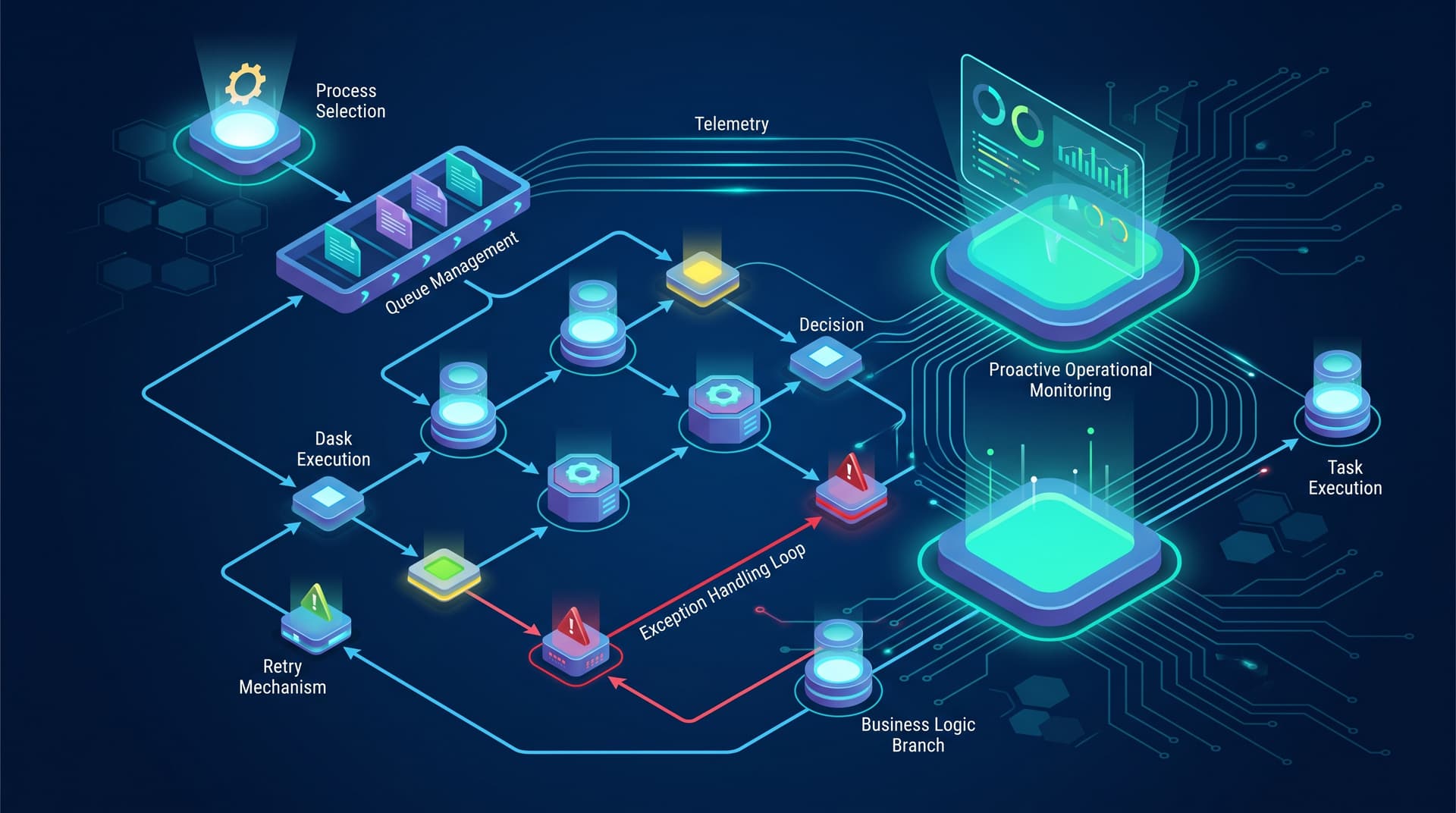
Production environments are dynamic. Network interfaces drop, target databases occasionally lock, and vendor invoices arrive with missing line items. A reliable RPA architecture distinguishes cleanly between Technical Exceptions and Business Exceptions, handling each through dedicated recovery pipelines.
Technical Exceptions
Technical exceptions stem from systemic or environmental failures during bot execution. Examples include network timeout, missing desktop window handles, target system downtime, or unexpected application pop-ups.
Engineering Blueprint for Technical Exception Recovery:
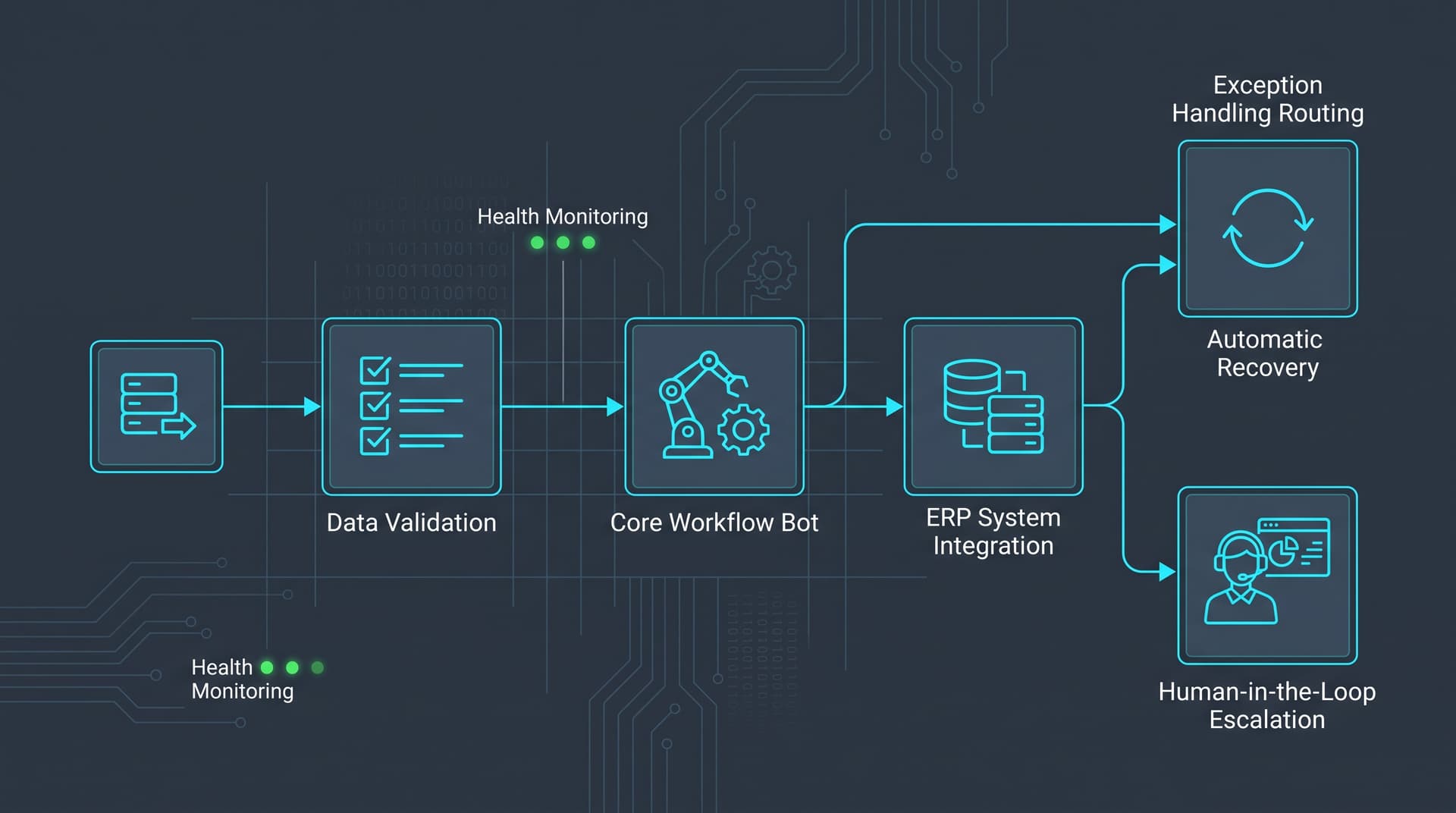
- Automated Re-try Mechanisms: Implement exponential backoff retry policies for transient network drops or locked database tables (e.g., retry up to 3 times spaced 30, 90, and 300 seconds apart).
- Graceful Application Reset: When a target UI state becomes unrecoverable, the bot must kill the application process, clear temporary session files, log state metrics, and launch a fresh session.
- Fail-Safe Transaction Logging: Maintain atomic transaction states in an external queue or ledger. If a bot crashes mid-transaction, the task is returned to the queue with a status flag to prevent duplicate processing.
Business Exceptions
Business exceptions occur when the target application functions correctly, but the incoming transactional data violates business rules or validation thresholds (e.g., an invoice subtotal does not match the purchase order total, or an invalid vendor ID is supplied).
Engineering Blueprint for Business Exception Escalation:
- Non-blocking Execution: The bot logs the failed transaction record along with specific validation failure codes and continues processing subsequent items in the queue.
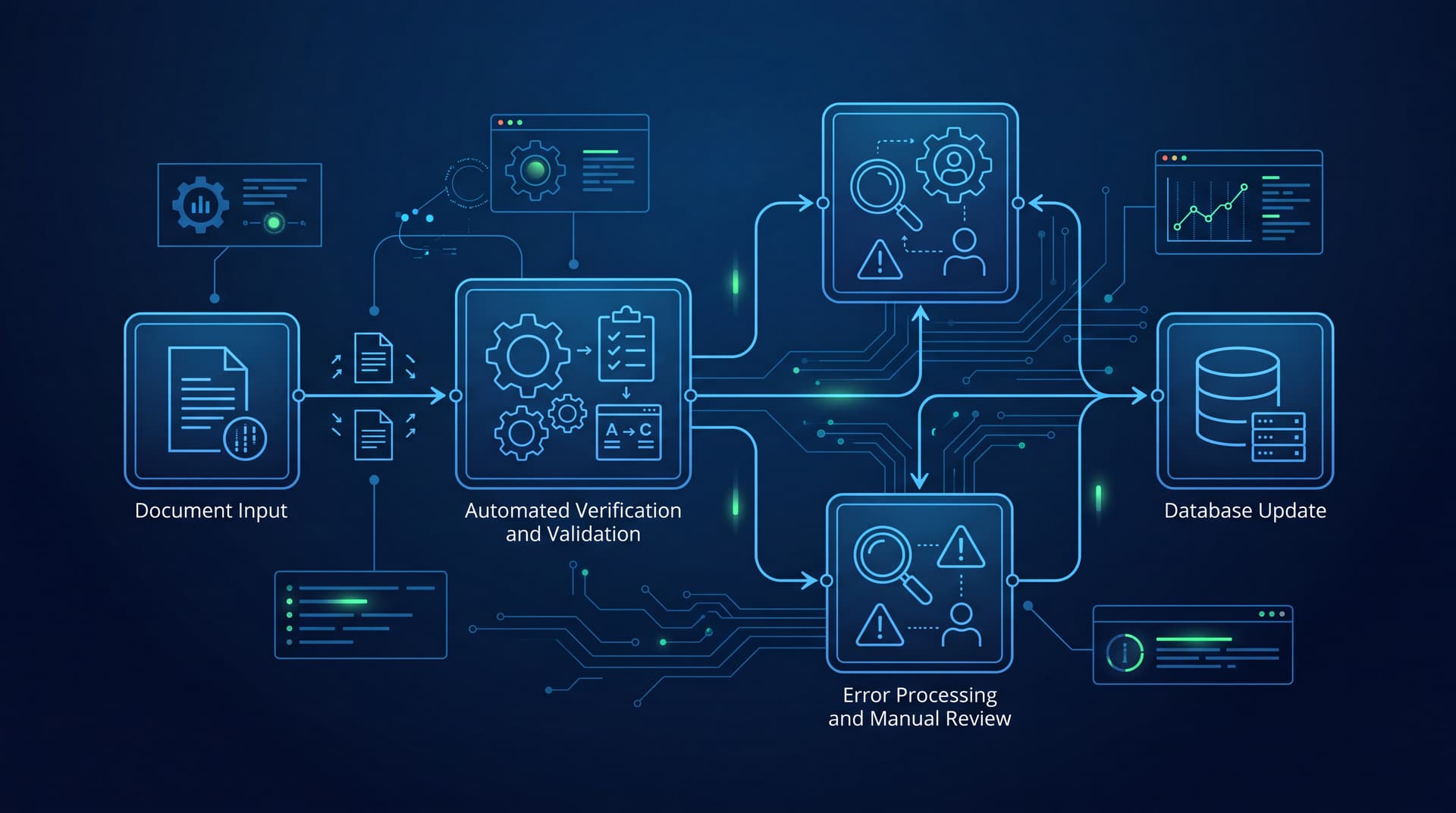
- Human-in-the-Loop Escalation Queues: Route flagged exception items directly to an operations team review portal or exception ticket system.
- Detailed Fault Diagnostics: Provide human reviewers with screenshot captures, execution timestamps, source file references, and specific rule violation descriptors to enable rapid human resolution.
Operational Monitoring, SLA Tracking, and Health Dashboards
Bot management requires the same level of monitoring as traditional microservice infrastructure. Operating workflow bots without structured telemetry leads to hidden backlogs and silent execution failures.
Key operational metrics to monitor continuously:
- Heartbeat & Queue Depth: Track real-time execution heartbeats to verify active bot health alongside pending task queue volume.
- Transaction Failure Rate Thresholds: Set automated alerts if transaction error rates exceed defined operational thresholds (e.g., >5% error rate within a 1-hour rolling window).
- Processing Velocity and SLA Deadlines: Monitor average handling time per item to project queue completion times against enterprise service level agreements (SLAs).
- Selector Drift Indicators: Track recurring element search timeouts across bots to proactively identify underlying UI updates before widespread operational failures occur.
Enterprise monitoring dashboards integrated into centralized management platforms like Bitscaled Workspace provide operational teams with instant operational oversight, enabling rapid remediation of failing workflows.
Before/After Workflow Example: Accounts Payable Invoice Processing
To illustrate the operational impact of structured RPA solutions, consider a standard back-office Accounts Payable (AP) workflow within a financial operations department.
Manual Process (Before RPA)
- Intake: AP specialist manually opens incoming email attachments containing vendor invoice PDFs.
- Data Extraction: Specialist reads invoice details and key-enters invoice number, date, line item amounts, and tax numbers into an ERP system.
- Cross-Checking: Specialist opens a separate purchase order (PO) management software to verify matching lines and prices.
- Discrepancy Handling: If amounts differ, the specialist manually drafts an email to the vendor asking for clarification.
- Posting: If details match, the specialist manually clicks through six confirmation screens to post the entry for payment.
Throughput: Average 12 minutes per invoice; 4.2% human entry error rate; backlog spikes during end-of-month financial reconciliation.
Automated Process (After RPA)
- Automated Intake: An RPA bot continuously polls a dedicated invoice inbox, downloading incoming attachments into a secure staging directory.
- Optical Data Extraction: The bot parses structured header and line item data using template extraction rules.
- Automated Validation: The bot queries the ERP database via backend query or UI automation to verify matching PO balances and line items.
- Conditional Routing:
- Match Success: Bot inputs invoice entries into the ERP, uploads the PDF document attachment, posts the transaction, and logs a success audit record in <30 seconds.
- Discrepancy / Business Exception: Bot routes mismatched line items directly to an AP specialist's exception queue with side-by-side visual diff highlighting.
- Audit Logging: System logs transaction metrics and telemetry to an enterprise dashboard for management review.
Throughput: Average 35 seconds per standard invoice; zero manual entry errors on matched items; exception review time reduced from 12 minutes to under 90 seconds per exception case.
Operationalizing Your Bot Strategy with Bitscaled
Building reliable workflow bots requires combining domain-specific process knowledge with robust software engineering architecture. Without proper process selection, automated retries, and centralized telemetry, robotic process automation can easily become an operational burden rather than a productivity driver.
Bitscaled partners with enterprise operations teams to evaluate process candidates, design resilient automation architectures, and deploy monitored Automation Services. By pairing robust exception handling with custom automation engineering, Bitscaled ensures your back-office workflows operate with deterministic reliability.
Identify your first RPA candidate process with Bitscaled by exploring our RPA Services or reaching out directly through our Contact Page to schedule an operational process engineering assessment.