Sustained RPA Reliability: Operational Frameworks for Back-Office Workflow Bots
Introduction: Beyond the Scripted Pilot
Robotic process automation (RPA) frequently enters back-office operations with high expectations. Operations leaders envision virtual team members executing repetitive, data-intensive tasks at speed without human fatigue. However, transitioning a prototype bot into an enterprise-grade production environment often exposes operational vulnerabilities. A minor change in a web application interface, an unexpected format shift in an incoming vendor invoice, or a transient network disruption can freeze a poorly engineered bot, forcing manual intervention and creating backlog cascades.
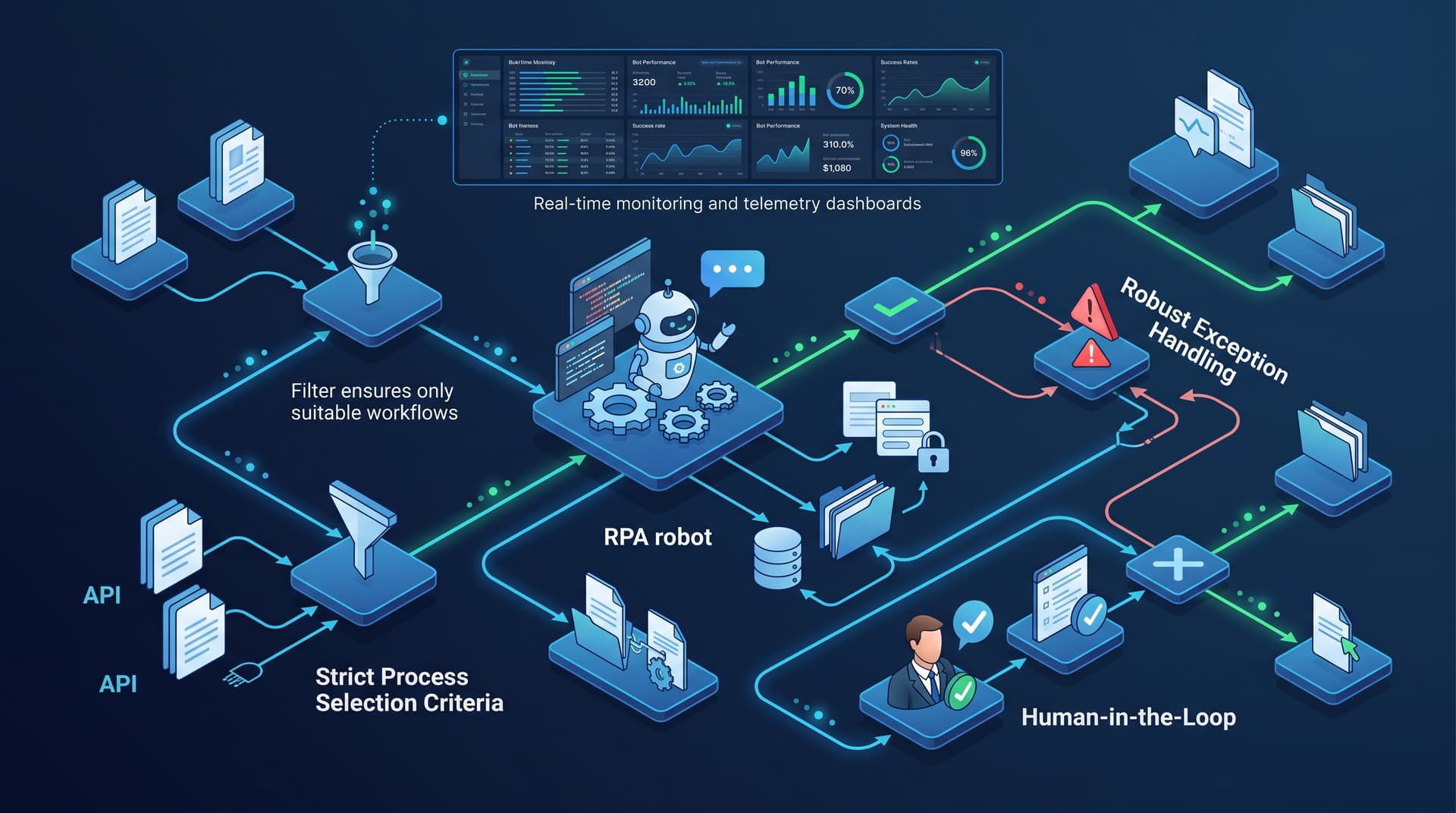
Achieving long-term ROI from robotic process automation requires shifting focus from quick script creation to deterministic process engineering. Reliable bot operations depend on rigorous process selection, clear separation of business and system exceptions, proactive telemetry monitoring, and knowing when alternatives like direct API integrations are superior. This guide provides operations managers with a practical blueprint for structuring end-to-end RPA solutions that deliver consistent, fault-tolerant performance.
1. Process Selection Criteria: Engineering for Bot Success
Not every manual process should be automated with RPA. Attempting to deploy software bots over ambiguous, highly subjective, or constantly changing workflows creates fragile automations that consume more maintenance time than they save. To isolate high-value candidates, evaluate back-office workflows against six baseline technical and operational criteria:
- Data Structure and Standardisation: Inputs must be digital and machine-readable (e.g., CSV, structured PDFs, XML, database queries). Unstructured physical paper or handwritten notes require pre-processing before RPA can function reliably.
- Rule Determinism: The workflow must rely on explicit logical rules (
IF/THEN/ELSE) without requiring qualitative human intuition or subjective decision-making during standard execution. - Application Stability: Target applications (ERP, CRM, legacy green-screens, web portals) should have stable interface elements and predictable release schedules.
- Volume and Execution Frequency: Higher transaction volumes yield greater operational leverage, justifying the initial engineering and testing effort.
- Process Standardisation: The underlying business steps must be standardized across teams before automation. Automating a fragmented or inconsistent process merely accelerates operational errors.
- System Access Limits: The target environment must support stable service accounts with consistent permissions and credential management.
Heuristic Process Evaluation Matrix
To assist operations teams in scoring candidate workflows, the following illustrative evaluation matrix categorizes processes into implementation tiers based on risk and feasibility:
| Evaluation Dimension | Optimal RPA Candidate | High-Risk Candidate (Needs Refinement) |
|---|---|---|
| Input Format | Structured electronic files (JSON, CSV, standardized forms) | Unstructured emails, freeform text, physical documents |
| Logic Rules | 100% deterministic, rule-based branching | High reliance on subjective human judgement |
| System UI Stability | Core enterprise systems with infrequent UI updates | Frequently updated third-party web apps |
| Exception Rate | Under 5% expected exception edge cases | Over 20% manual edge cases or non-standard inputs |
| Access Security | Dedicated service accounts with credential vaults | Shared user logins requiring MFA hardware tokens |
Takeaway: Selecting workflows with high rule determinism and low UI volatility dramatically reduces post-deployment bot maintenance.
2. Before and After Workflow Example: Accounts Payable Invoice Matching
To illustrate the operational transformation achieved through resilient RPA engineering, consider a classic back-office bottleneck: Accounts Payable (AP) invoice entry and purchase order (PO) matching.
The Manual Process (Before)
- An AP specialist downloads vendor invoices from a shared email mailbox.
- The specialist manually opens each PDF, reads the vendor name, invoice number, line items, total amount, and tax values.
- The specialist logs into the enterprise resource planning (ERP) system and searches for the matching open PO.
- Line item totals are cross-referenced manually. If the values match within a $5 tolerance threshold, the specialist approves the invoice and keys in the line items.
- If a line item discrepancy occurs, the specialist opens an email draft to notify procurement, flags the invoice as pending, and logs the issue in a spreadsheet.
Operational Bottlenecks: Processing each invoice takes 8 to 12 minutes. Human error during data entry occurs in roughly 3% to 5% of records during peak end-of-month volume, causing payment delays and audit friction.
The RPA-Engineered Process (After)
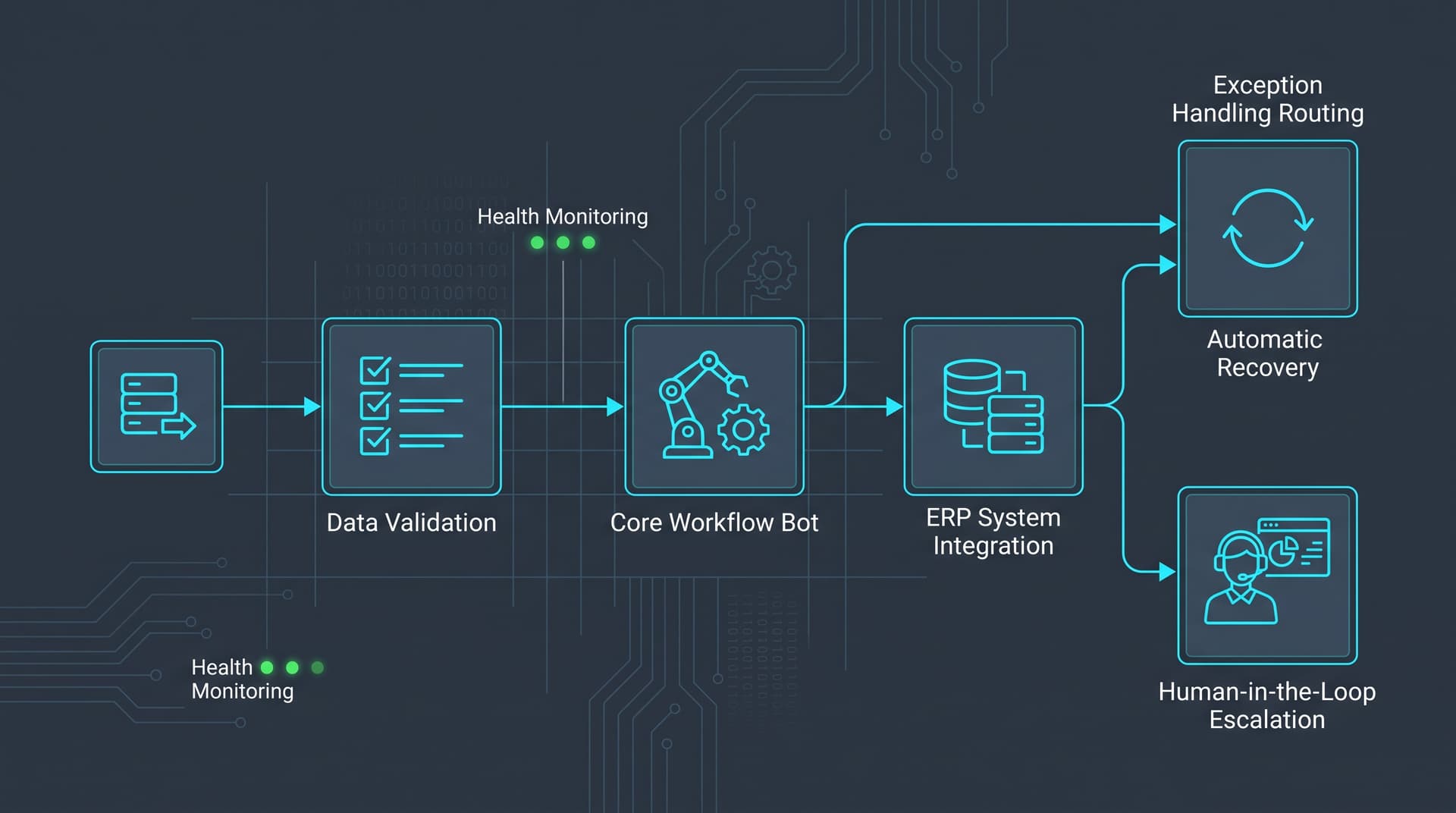
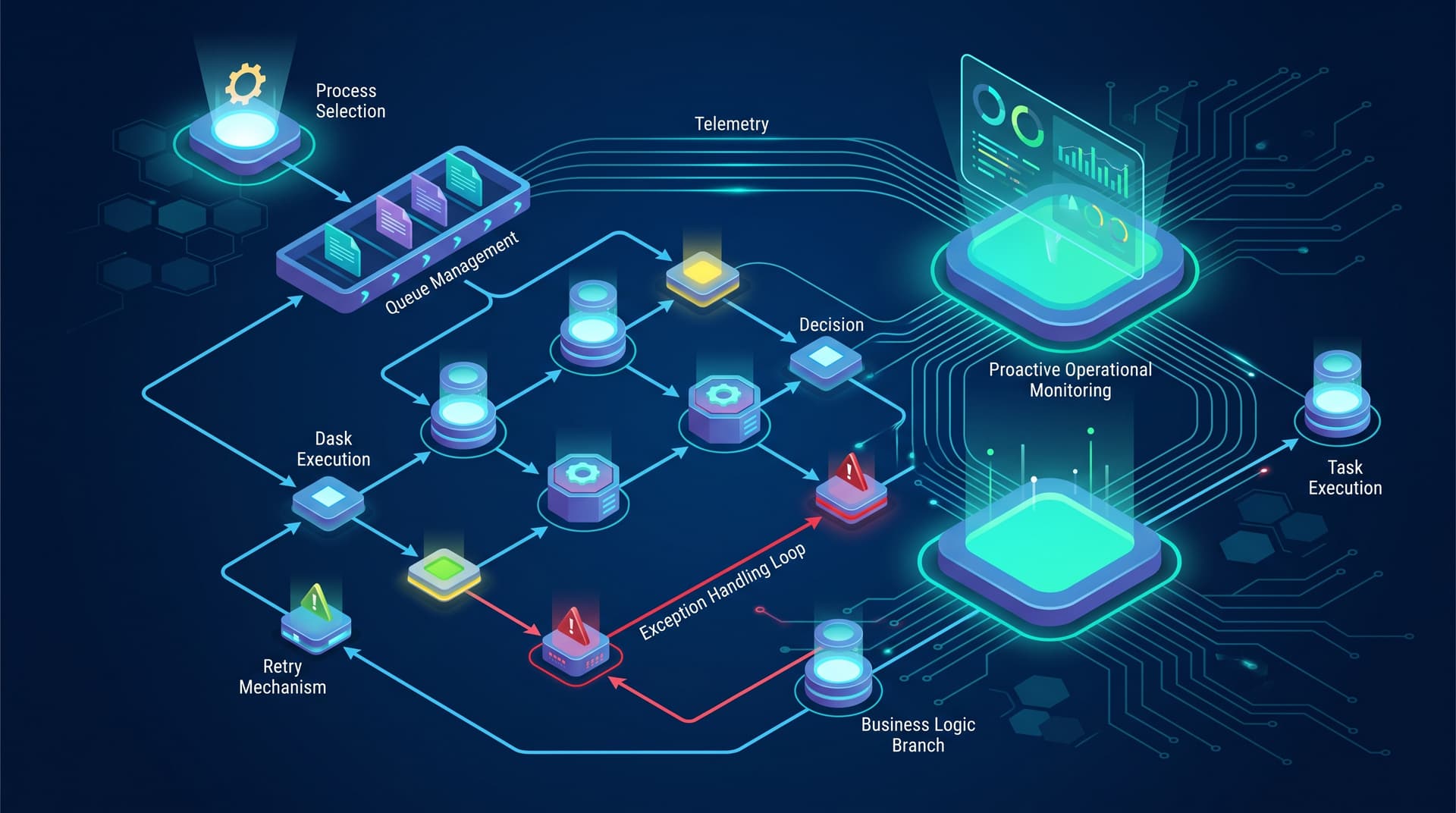
- Trigger & Queueing: A scheduler or email listener detects a new invoice, stores the attachment in a secure repository, and pushes a transaction item into a transactional queue.
- Data Extraction & Verification: An optical character recognition (OCR) or document processing service extracts invoice data fields into a structured JSON payload.
- Automated Matching Engine: The RPA bot retrieves the queue item, authenticates into the ERP via API or stable interface controls, and queries the open PO table.
- Execution & Routing:
- Happy Path: If PO number, total sum, and vendor ID match rules, the bot creates the invoice record in the ERP, attaches the PDF document, and updates status to "Approved for Payment."
- Business Exception Path: If line-item discrepancy exceeds tolerance, the bot tags the transaction with a specific exception code (
ERR_PRICE_MISMATCH), creates a flagged ticket in the finance portal, and routes it directly to the designated procurement owner.
- Transaction Closure: The bot logs complete execution metrics (start time, processing duration, outcome code) and pulls the next item from the queue.
Operational Outcome: Average unit processing time decreases to under 45 seconds per invoice. Straight-through processing handles 85% of transactions automatically, while human specialists focus exclusively on the 15% routed to the business exception queue.
3. Designing Robust Exception Handling & Error Recovery
In reliable bot operations, errors are not surprises; they are anticipated flow branches. Unhandled exceptions crash execution threads, corrupt transactional states, and leave back-office systems out of sync. Engineering resilient RPA solutions requires dividing all failures into two clear categories:
A. Business Exceptions
Business exceptions occur when system conditions are nominal, but transaction data violates predefined operational rules (e.g., missing vendor tax ID, invalid purchase order number, or credit limit exceeded).
- Handling Strategy: Bots should never retry a business exception without changes to the underlying data. Upon encountering a business rule failure, the bot should capture screen artifacts, write a structured log entry detailing the exact failure condition, tag the queue item as
BusinessException, and cleanly exit the transaction to process the next item. - Human-in-the-Loop Routing: Business exceptions must automatically route to operational dashboards or task management queues where human operators can correct the data or override the block.
B. System Exceptions
System exceptions occur due to infrastructure or interface instability—such as an ERP system timeout, a network connection failure, target application slowdowns, or an unexpected modal pop-up overlaying an input field.
- Handling Strategy: Implement automated retry policies using exponential backoff logic (e.g., retry after 30 seconds, then 2 minutes, then 5 minutes).
- Graceful Degradation and State Cleanup: If all retries fail, the bot must perform an environment reset: closing application instances, clearing browser cookies, terminating orphaned processes, and releasing row locks in the target database.
- Session Recovery: Once clean, the bot notifies monitoring alerts and shuts down cleanly or moves to an isolated clean runner to prevent cascading failure across subsequent queue items.
Takeaway: Never let a single failed transaction stop an entire automation pipeline. Isolate business exceptions from system failures to protect throughput.
4. Monitoring and Telemetry in Production
Deploying a bot is only the beginning of the operational lifecycle. Maintaining reliable bot operations requires proactive monitoring of performance metrics, system logs, and transactional health indicators.
Key operational monitoring pillars include:
- Heartbeat & Availability Tracking: Continuous checks to ensure virtual machines, runner agents, and scheduled background workers are operational.
- Queue Processing Velocity: Real-time visibility into queue depth, average item processing duration, and throughput relative to operational SLAs.
- Failure Rate Thresholds: Automated alerting triggers when overall transaction failure rates cross defined control limits (e.g., > 5% system exceptions over 15 minutes).
- UI Element Health Monitoring: Operational tracking of screen selector failure trends, signaling when target application updates have broken element locators before catastrophic backlog growth occurs.
By leveraging standardized log formatting and centralizing execution records into operational management platforms like the Bitscaled Workspace, operations leaders gain actionable visibility into capacity utilization, bot availability, and exception rates across all active automated processes.
5. When NOT to Use RPA: Identifying Anti-Patterns
While software bots are powerful tools for bridging operational gaps, forcing RPA onto improper use cases generates high technical debt and ongoing operational disruption. Operations managers should avoid deploying RPA in the following scenarios:
- APIs Are Readily Available: If both source and target applications offer documented, secure REST or SOAP APIs, native integration via API connectors or middleware workflows is vastly superior to RPA user interface automation. API interactions are faster, more secure, and immune to screen design shifts.
- Unstable or Fast-Changing Interfaces: Deploying UI-based bots on applications undergoing continuous rapid frontend updates leads to constant script breaks and high maintenance overhead.
- Low-Volume, Ad-Hoc Tasks: Developing, testing, and maintaining an RPA workflow for a task executed only once a month for a few records consumes more engineering effort than the manual time saved.
- Unstructured Data Without Pre-processing: Passing raw, unformatted free-text emails or variable hand-drawn documents directly to basic RPA bots without integrated AI parsing leads to unmanageable business exception rates.
When native integration pathways exist or process logic remains unstable, alternative approaches—such as backend integrations, direct database connections, or API-first automation frameworks available through Bitscaled Automation Services—provide far greater operational stability.
Strategic Implementation Checklist
Before releasing any new robotic process automation into live operations, review this operational readiness checklist:
- Process inputs and logical rules are fully documented and deterministic.
- Target systems have dedicated, non-person service accounts with credential management via secure vaults.
- Business exception routing is configured with designated human-in-the-loop owners.
- Automated retry mechanisms and environment reset scripts are implemented for system exceptions.
- Queue depth, processing velocity, and alert triggers are wired into monitoring dashboards.
- Fallback operational procedures are established for manual processing during target system outages.
Conclusion: Building Scalable, Resilient Automation
Reliable bot operations are not created by chance—they are engineered through disciplined candidate selection, fault-tolerant exception architecture, and proactive operational monitoring. By treating software bots as enterprise assets that require robust exception handling and strict process governance, operations teams can eliminate manual bottlenecks, reduce error rates, and deliver predictable back-office throughput.
Ready to transform your back-office operations with enterprise-ready automations? Identify your first RPA candidate process with Bitscaled and build resilient, high-availability workflow bots today.